Yes I did a Bug report, several. Just asking if anyone else has this problem. Guild Co Masters cannot Promote. They can do Bank and invite, but not promote. I Googled and was told I MUST Authenticate with Discord. I do not have Discord I do not want Discord, but in order for My Co Guild Master I MUST do Discord Authenticator? Is this true? I only noticed this problem the end of July. And it is both Guilds on different Realms Guilds. If I want to delete my Guild Master What happens? I change realms and Delete characters couple times a year. Irritating.
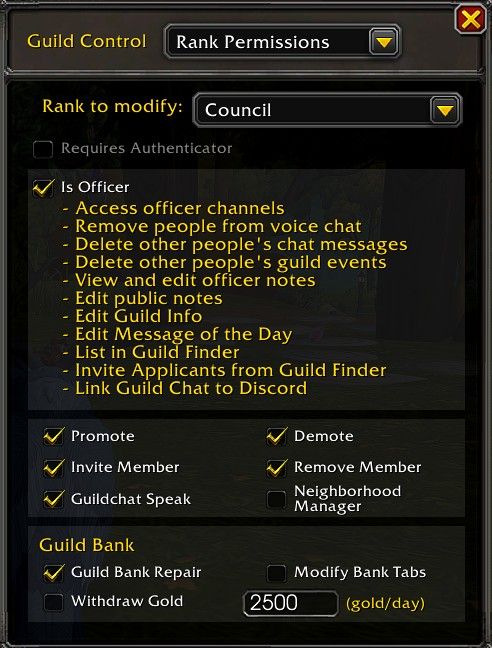
Did you check the permissions? Guild permissions in game have nothing to do with Discord.
But if you have “requires authenticator” checked off, then they need a Battlenet authenticator.
If you don’t have that checked off, make sure “Promote” is check off. It’s not under “is officer.”
2 Likes
Yes. I checked this and then I checked the can promote, can remove. And they can’t. I have reported this more than once over the month. I am beginning to think it will never be fixed. I have 2 Guilds on different realms and this is happening on both. I am sure it is because Blizz did the Discord thing.
My guild permissions are working just fine and I’ve talked to several others who don’t have an issue. Blizz reset the “Is Officer” section when they implemented the Discord stuff. Nothing else was touched.
Make sure the “requires authenticator” box isn’t checked off. Make sure people are at the correct rank. Make sure that rank has the correct permissions.
Then try these troubleshooting steps:
- Exit game, delete the cache folder in the Retail folder.
- Do a full UI reset from this link.
- Turn off Windows Fast Startup by following the very quick steps in this video. Fast Startup actually caches data from WoW for some reason and it can mess up the weirdest things in the game.
1 Like
It did not help. I uninstalled and reinstalled the game and that did nothing. I have 2 Guilds on different realms and this happened to both the first part of August. I am so frustrated. I do not know why it can’t be fixed. The Officers can use the Bank and mess with the tab they can even do whatever the Authenticator for Discord is. That is why I am sure it has soemthng to do with that. But they cannot promote or Demote.
That doesn’t fix things.
There is no authenticator for Discord that is needed for permissions. There is a Battlenet authenticator if you want that rank to have one for those permissions.
Officer. I Click Guild Setting, the box pops up and says Discord Authenticator The only thing in the Box say OAuthent. They can Remove people and invite but not promote. Thanks for the help but I do not do Videos, I do not like sound very much. I read, and look at pictures, but do not like videos, I watch movies, so I’m kind of strange.  I Do not understand why this happened.
I agree with Sendy, I think you must have the “Requires Authenticator” checked off under the Rank Permissions heading. Promoting and demoting have nothing to do with Discord.
1 Like
Guildmaster has to change the guild settings, officers cannot change that setting as far as i know its the one that makes any officer have to have an authenticator.
Doesnt have anything to do with discord any discord problems are unrelated
1 Like
Well, look at this image and then answer the following questions with a yes or no:
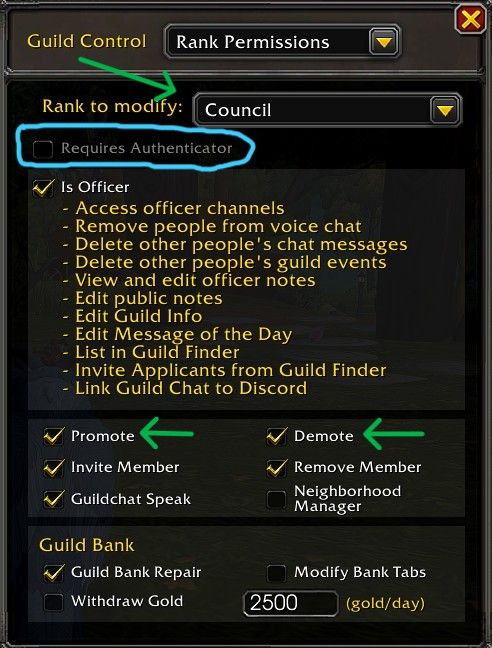
- Do you have the correct rank selected? (green arrow at the top)
- Do you have Requires Authenticator checked? (blue circle)
- Do you have Demote and Promote checked off? (green arrows in the middle)
2 Likes
Excellent tutorial, Sendy.
1 Like
Thanks! I’m trying to narrow down where our issues are and how I can help. 
2 Likes
Nope. I wondered. so I checked when this first happened. And I always check when I mess with the Guild settings. no one has that little box checked. I just looked again, and no it is not checked. I do not play with sound.
Also make sure you have the promote and demote boxes checked for the correct rank, like Sendy shows on her post.
They are on both Guilds, on separate realms.
I need you to do two things:
- Answer the yes or no questions I asked above.
- Take a screenshot of your guild permissions, host it on Imgur, ImgBB, etc. and use the Preformatted Text option in the text editor to paste the link here. It will put ` on both sides of the link so you can post it.
1 Like