Replay mode Bugged interface

It is a 256 x 256 map … Not sure if it map specific. Since other replays of 256x 256 maps work.

Interestingly i have two replays that are bugged like this and i cant find the map played on it… or can i ?

I only find a map, that seems the same map, but is called 192 192 Korean stuff…
Even though it is 256 map … So i think it is that map, but for some reason ingame when searching for maps it has an other name…

Patch is the one from the day of this post.

From my experience, the korean characters within the title of the map mess up the UI, at least that goes for the observer mode, but it wouldn’t come as a surprise if that would also affect the replay mode.

What you can try is to rename the file using latin characters, since you can’t modify the title of the map, since it’s in replay format.

Another culprit might be the custom sounds within the map The fix is to remove the sounds, but that works only if you have the map. Try to remove the sounds only after you made sure you have tried renaming the title of the map and the file name using latin characters.

Actually, you can use this tool:
https://scr2bw.glitch.me/
to convert the SCR replay to a 1.16.1 replay.
If you succeed, then you can use ReXplorer to extract the map within the 1.16.1 replay.

More about ReXplorer over here:
https://liquipedia.net/starcraft/ReXplorer

Download link:
https://web.archive.org/web/20100709230808/http://repasm.net/rx/files/ReXplorer.exe

Let me know what you have ended up trying, because I’m curious to find out.

Edit:
It seems ReXplorer needs to be run in compatibility mode, using Windows XP (Service Pack 3). Also, ReXplorer requires for SC 1.16.1 to be installed.

1 Like

I completely forgot about these replay tools:

  • https://repmastered.app/
  • https://www.scrchart.com/

You can upload the replay to repmastered.app and it will show you the title of the map, but not the map filename. This tool will display korean characters properly.

scrchart.com does the same, but it doesn’t properly display korean characters when it comes down to the title of the map.

There is a third tool, namely Process Explorer:
https://docs.microsoft.com/en-us/sysinternals/downloads/process-explorer

To use this, load the replay in Starcraft R, then head over to Process Explorer > right click Starcraft in the list > pick Properties > Strings > select the Memory radio button.
Wait for a minute to complete, once it does, click the Search button and look for a player’s name within the replay. Find all the instances of that name while looking around in its proximity for a map title.

If you don’t have a player’s name, then it’s gonna be painful as you’d have to guess which of the strings resembles a map title.

This tool also doesn’t properly display korean characters, unless you have installed the korean language pack on your Windows. This solution should work for SCRChart as well.

There are other solutions for displaying korean characters within programs without having to install the korean language pack, but I can’t really recall how I’ve done it. If you’re really interested on how I’ve done it, let me know, and I might find out a way to check on how I used to do those things.

1 Like

Ok so far…

Changing the reply name to latin letters doesnt change the replay ui to normal… Still bugged.

The game itself was played as top vs bottom mode. At least according to the replay information. Since i dont really remember as what is what played.
As such it is a bit hard to replicate the exact process. Since i would need to go multiplayer and wait for people actually joining.
When i launch the game in singleplayer, the replay will work just fine and the entier UI is shown with ressources and stuff.

I uploaded the replay to the repmastered app. And than i have downloaded. It is still bugged.

Strangly i can see most of the analyze data like apm, build order, strategy, etc.
But it will not show me the hotkeys of one of the players, though this seems to be the case in other repalys aswell.

The good thing is as you said yourself, i could finally confirm that it is in fact not same map as the other i thought…
In fact i cant find the map this replay was played on …
I assumed it was the same map because it was same size or at least closed to it. And the id was the same. But the other was a bit different it had an water part at the front lmao. I feell stupid for not noticing it before even though it was all the time infront of my eyes…
The thing is i just couldnt find the map and it looked very similar, but quite different. The name also is quite different.
I searched the documents folder, the normal starcraft main folder… The map isnt there or doesnt want to be found …

At least, know i know that is probally the map… Since the two replays i have on this map are bugged/ missing user interface.

The name of the map:
256x 256 초대형 빠른 무한맵 made by waros (1.00v)

here is the replay if you are interested, maybe somebody finds some use of it:
repmastered.app/dl/IIpWzUYZDy8UyPJmUOWKAbB3-29EVE6FwKZGrMeF7qA.rep

I also tried to watch the replay on shieldbattery, but there is the same problem with ui …

though i could convert the replay with the website you provided, i couldnt watch it on my 1.16.1 version of the game…
Rexplorer didnt work for me … I used compability mode of widows. I even could install and customize its settings, but it didnt show no extra option the right click tab …
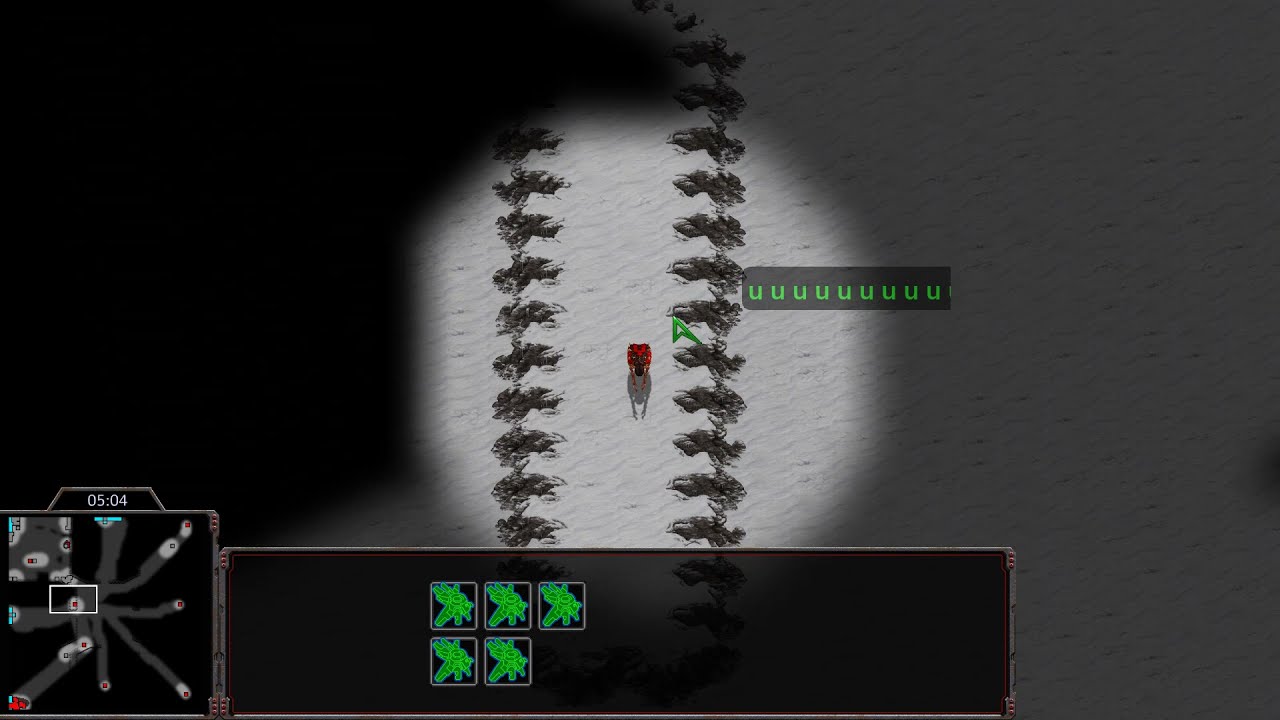
Hmm, that’s strange, no hotkeys for one of the players. But, actually, have you thought that maybe that player didn’t use hotkeys at all? gfgfhhg’s APM seems to be 76. I know that there are players that can get that kind of APM without even having to use hotkeys.

https://scr2bw.glitch.me/ didn’t seem to work for me either, even though I had used your replay and another replay based on the map Bottleneck. I also converted the replays by using both the ticking on and ticking off the checkbox on the site, but got no success in playing the in SC 1.16.1.

About ReExplorer, it seems it doesn’t work for me either. I tested it on 2 Windows 7 machines, but I had no SC 1.16.1 installed on them. I also ran it on a Windows XP Professional SP3, but this time the program couldn’t even install…, maybe it’s the Windows’ fault as it might be broken (haven’t reinstalled it for a very long time).

Here are some solutions:

  1. Get the map size and tileset of the replay using SCRChart, then head over to Starcraft’s map browser and look for the values of the 2 attributes, that’s the easiest way to narrow down the map.
    https://i.imgur.com/Lr8thsr.png
    https://i.imgur.com/8Q44Vf9.png

  2. You could ask the developer of StarCraft Map Browser if he could add to the program filters like map size and tileset (maybe also add the minimum and maximum number of players that a map requires, as well as how many CPUs a map has), which could be mixed at the same time and if he could also add support for korean characters for both the filename and the title of the map. That would make his program dope.
    Here’s where he’s posted the program:
    https://tl.net/forum/brood-war/559817-starcraft-map-browser
    and
    https://github.com/gform/StarCraftMapBrowser
    You should use the github page to ask him that. I plan to ask him as well. I think that if he sees that more people are interested in his tool, he might decide to implement the above.
    Here’s the link where you can ask him about that:
    https://github.com/gform/StarCraftMapBrowser/issues/new

  3. You can take parts of the title 256x 256 초대형 빠른 무한맵 made by waros (1.00v), for example 초대형 and paste it in the Starcraft map search bar, maybe you’ll get a hit.

  4. To try out ReExplorer, you could run this ready made image of Windows XP provided by Microsoft in VirtualBox. Here’s some articles on how to do that:
    https://www.makeuseof.com/tag/download-windows-xp-for-free-and-legally-straight-from-microsoft-si/
    or
    https://helpdeskgeek.com/virtualization/how-to-set-up-a-windows-xp-virtual-machine-for-free/

  5. The last solution would be to get the .chk out of an .scx/.scm, using an automated tool, and look for the values (hexadecimal) of sections like “DIM”, “ERA” and some others, and build filters based on it. Maybe I’m wrong, and maybe this information can be extracted straight from the .scx/.scm file. This solution is more for a programmer.
    More info about it over here:
    http://www.staredit.net/wiki/index.php?title=Scenario.chk

Stacked-minerals (Fastest) maps generally have a problem with this site:

https://scr2bw.glitch.me

I’ve only been able to convert 3 recent Stacked-minerals replays (2021), 1v1, 2v2, 3v3, the checkbox there that says: “Attempt to match map tiles” is only useful for SCR EUD maps, which basically contain new ramps, or new terrain/tiles that aren’t supporter by SC 1.16, the most known maps for this is Sylphid, it has a new ramp on 3 O’clock and it can’t normally run on v16 without some modifications, so you must check that checkbox for it to work, other normal maps like FS/CB don’t need that, but I guess its not a problem checking the box anyway, you’ll just get some weird tiles/terrains.

The problem is some replays that seem to be converted successfully, do some weird desync issues while playing the replay, like the workers are idle and doing nothing, which means this replay is corrupted and the conversion didn’t work successfully.

I think I could say that the probability of this site to successfully convert SCR replay to v16 is 50%, so you just test your luck .

ReXplorer works flawlessly :yum: on my side without VMs, what a nice piece of software we’re all missing, and I’m even planning to add it to the next release of BWAPI Revamped.