Hello, I get disconnected a ton, sometimes it let’s me rejoin sometimes I cant. During games I get the red thing on the top left I know ill be disconnected so I ult if I can to help the team out, I lose endorsement, though. I did the blizzard looking glass BUT it wont let me post my results. I have Spectrum ISP
1 Like
Howdy Fujikura,
Have you tried the steps here? If so, let’s get a MTR test:
- Download WinMTR (Console players need a Windows Desktop Computer connected to the same network as their console to do this.)
- Unzip the WinMTR.zip file to the Desktop.
- Open the WinMTR folder and select the 64 bit version.
- Run the WinMTR.exe as Admin
- Type the IP address you want to trace in the “Host” field. To get the correct IP you will actually need to open up the game and go Practice Vs AI or Quick Play and if you are on PC hit Ctrl+Shift+N and it will bring up the ingame network diagnostic graph, or go to Video > Options > Display Network Performance Graph if you are on any platform including Console. In the top left corner is the IP address you want to run WinMTR to.
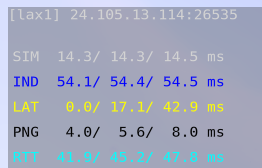
Note: You will want to leave the colon and last 5 digits at the end off and only use the first four set of digits (for example, 24.105.13.114 in the screenshot without the :26535). - Once you notice the connection issue while playing, play for about 6 more minutes, minimize the game and click on “Stop”.
- Click on “Copy text to clipboard”, then return to this forum thread.
- Type two sets of four squiggly lines and then paste the contents of the WinMTR test between:
~~~~ Paste WinMTR Test Results Here ~~~~
Note: Break links by adding a space before .com/.net, so you can post them. If you have issues pasting here, please use Pastebin and post the link (ex: Pastebin (dot) com/123456).
2 posts were split to a new topic: [Roadhog] connection drops