Hello! I have been playing D3 on this computer for several years now. After the 2.7 patch yesterday I can no longer launch Diablo. The Diablo III64.exe process appears in task manager for only a second then dissappears.
I tried to scan/repair, reinstall, reboot, updated video drivers, everything I can think of and nothing has fixed this. Before I reinstalled the Scan/Repair would get to the end and say “something happened try again” and would continue to happen.
Below is the dxdiag results. Please advise - I cannot play at all.
I could not paste the results - too big. Here instead:
Thanks in advance - please help!
msinfo32 output:
| OS Name |
Microsoft Windows 10 Pro |
| Version |
10.0.15063 Build 15063 |
| Other OS Description |
Not Available |
| OS Manufacturer |
Microsoft Corporation |
| System Manufacturer |
Dell Inc. |
| System Model |
Precision 7820 Tower |
| System Type |
x64-based PC |
| System SKU |
0739 |
| Processor |
Intel(R) Xeon(R) Gold 6128 CPU @ 3.40GHz, 3392 Mhz, 6 Core(s), 12 Logical Processor(s) |
| Processor |
Intel(R) Xeon(R) Gold 6128 CPU @ 3.40GHz, 3392 Mhz, 6 Core(s), 12 Logical Processor(s) |
| BIOS Version/Date |
Dell Inc. 1.0.3, 9/5/2017 |
| SMBIOS Version |
3.0 |
| Embedded Controller Version |
255.255 |
| BIOS Mode |
UEFI |
| BaseBoard Manufacturer |
Dell Inc. |
| BaseBoard Model |
Not Available |
| BaseBoard Name |
Base Board |
| Platform Role |
Workstation |
| Secure Boot State |
On |
| PCR7 Configuration |
Elevation Required to View |
| Windows Directory |
C:\Windows |
| System Directory |
C:\Windows\system32 |
| Boot Device |
\Device\HarddiskVolume1 |
| Locale |
United States |
| Hardware Abstraction Layer |
Version = “10.0.15063.502” |
| Time Zone |
Central Daylight Time |
| Installed Physical Memory (RAM) |
64.0 GB |
| Total Physical Memory |
63.7 GB |
| Available Physical Memory |
51.8 GB |
| Total Virtual Memory |
128 GB |
| Available Virtual Memory |
112 GB |
| Page File Space |
64.0 GB |
| Page File |
C:\pagefile.sys |
| Device Encryption Support |
Elevation Required to View |
| Hyper-V - VM Monitor Mode Extensions |
Yes |
| Hyper-V - Second Level Address Translation Extensions |
Yes |
| Hyper-V - Virtualization Enabled in Firmware |
Yes |
| Hyper-V - Data Execution Protection |
Yes |
Howdy Lokei,
I would suggest starting by updating Windows to the latest version.
Our IT guy said “why haven’t you updated windows yet” and I said “because last time I tried you got mad…??”
The joys of working remotely and not having a computer on the corp domain.
Upgrading now - I will report back when it’s done. Thanks!
Ouch, yeah work computers can be pretty strict on OS upgrades. Hopefully this helps though!
I had to edit this post b/c I can’t reply until someone else does.
OK - Windows update is complete:
Version 10.0.18363 Build 18363
Still the same issue. Please let me know what else I can provide to help diagnose this problem.
----- old post ------
ok - upgrade to 18362 complete but still the same problem. Checked windows update and 1909 is downloading / installing now. fingers crossed.
Version 10.0.18362 Build 18362
not sure if it matters but here is the event viewer dump. I thought 0xc00…05 was access denied but I could be wrong.
Faulting application name: Diablo III64.exe, version: 2.7.0.8755, time stamp: 0x605ccec7
Faulting module name: Diablo III64.exe, version: 2.7.0.8755, time stamp: 0x605ccec7
Exception code: 0xc0000005
Fault offset: 0x000000000001c258
Faulting process id: 0x231c
Faulting application start time: 0x01d72722c42cd3d5
Faulting application path: C:\Program Files (x86)\Diablo III\x64\Diablo III64.exe
Faulting module path: C:\Program Files (x86)\Diablo III\x64\Diablo III64.exe
Report Id: 9b901c0f-4f84-4af7-b8c2-49dca04a1130
Faulting package full name:
Faulting package-relative application ID:
I have a similar issue where I can’t launch either… I’m not sure if this is caused by the same problem but in my case, when I try to launch Diablo 3, it pulls up a gray screen for about 5 seconds, and then closes the program. Sometime the gray screen stays there forever.
If you guys find a fix, please let me know! I’m getting desperate!
1 Like
Ripley - I will absolutely keep this posted if a solution is found.
Support / Zenlaka - not sure if this showed as an update since I had to edit the post but I have updated windows to the latest version and I’m still seeing the same error. Please advise.
I play the game yesterday without any issue, but today i can’t play, i make two updates today Compilation 2004-OS 19041.906 y compilation 20H2-OS 19042.906
!SUPER HAPPY UPDATE!
I was trolling through old reddit posts and someone said to try running in 32-bit mode and guess what - it works! Still doesn’t explain what’s happening, but thought it may be helpful to you to know it’s a 64-bit only problem at least for me. I will gladly provide whatever information I can to help figure out the issue.
I will also note that when the .exe shows up in task manager it never gets past 32k memory and goes away within a second or two. I get nothing - no d3debug file, no screen, nothing.
Also I verified WoW, StarCraft and several other games are launching just fine.
I am having the same issues this sucks and i did all of the uninstall and reinstall of all my drivers and game.
I uninstall and reinstall bnet and diablo3 and work for me.
Try the 32-bit thing if you haven’t. Click on the blizzard logo in the top left. Go to settings then game settings. Under Diablo 3 click the run 32-bit and give that a try.
Best of luck! I hope you get it figured out.
a lot players have issues since 2.7
i tried 32/64bit, always lagging, sudn issues, crashing, once even notloading
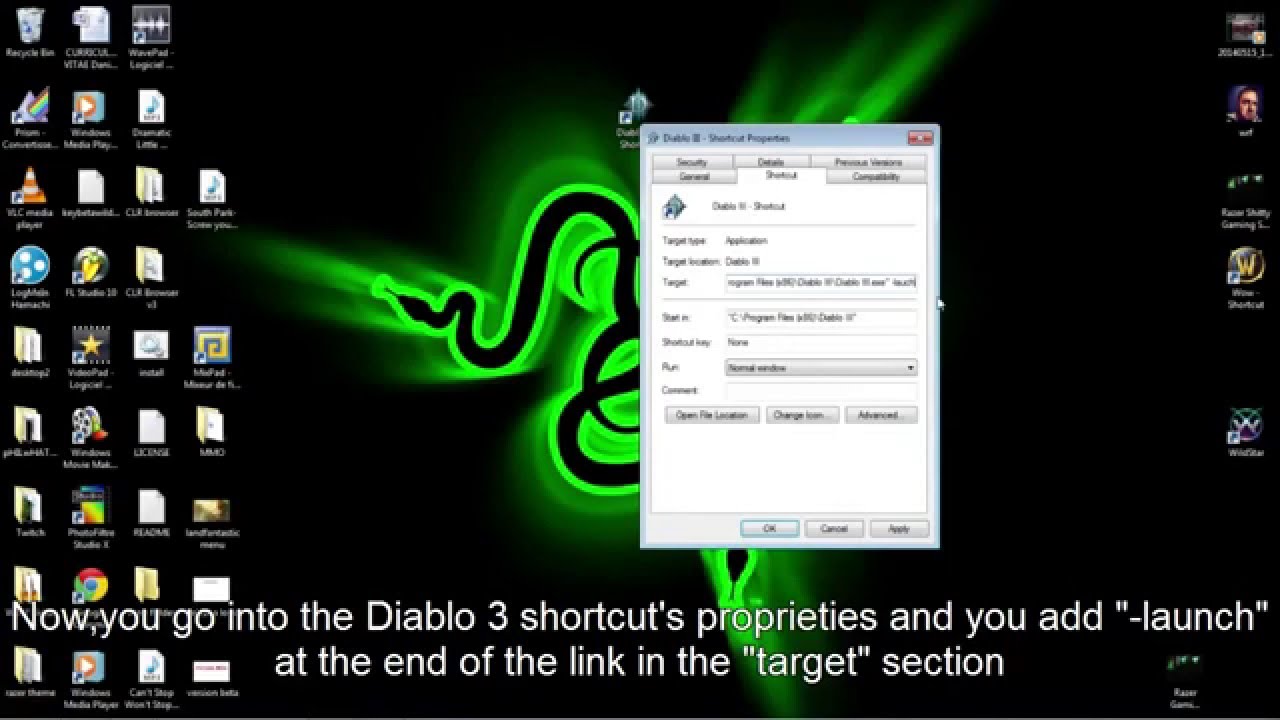
Alright so I was scrolling through posts about not being able to start since 2.7 launched and I figured that it has something to do with the battle net launcher not the game. You just have to launch the game by itself without battle net. Here is a video to explain it.
go into the main folder of diablo 3 and go into the 64 bit folder, find the game and create a short cut to it and once you’ve done that add -launch to the end of the target part of the short cut tab. After this you can add it to your task bar
i m launching regular my game that way, even for window mode, it does not solve the issue
Thank you for the suggestion @jaxonhunter. I tried this as well but was not able to get it to run the 64-bit version in this way.
Thanks